1.1: Introduction to the World Wide Web
Learn the history and core concepts of the World Wide Web, including how it was invented and how it works. Understand the client-server model, web browsers, and the fundamental technologies that power the modern internet.
1. History of the World Wide Web
The Birth of the Web
In 1989, Tim Berners-Lee, a British scientist at CERN (European Organization for Nuclear Research), invented the World Wide Web. His goal was to create a system for sharing information between researchers around the world.
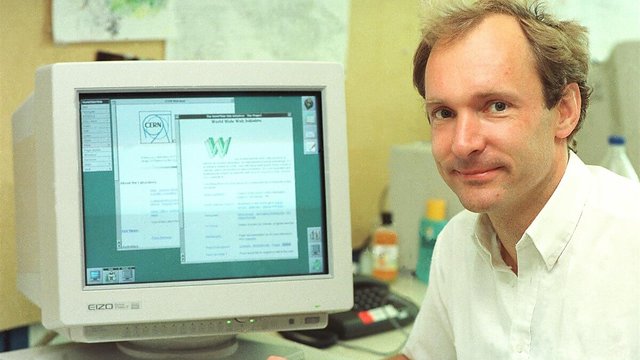 Tim Berners-Lee, inventor of the World Wide Web
Key innovations:
- HTML (HyperText Markup Language) - for creating documents
- HTTP (HyperText Transfer Protocol) - for transmitting documents
- URLs (Uniform Resource Locators) - for addressing documents
- First web browser - for viewing documents
::: info 📚 Fun Fact The first website ever created is still online! You can visit it at: http://info.cern.ch/hypertext/WWW/TheProject.html :::
Evolution Timeline
1989 - Tim Berners-Lee proposes the Web
1991 - First website goes live
1993 - Mosaic browser (first graphical browser)
1995 - JavaScript invented, dynamic websites born
2004 - Web 2.0 era (user-generated content)
2010s - Mobile web, responsive design
2020s - Web3, AI-powered web applications
2. Client-Server Architecture
The web operates on a client-server model. Let's understand each component:
The Client (Your Browser)
- Role: Requests resources and displays them
- Examples: Chrome, Edge, Brave, Safari
- Actions: Sends HTTP requests, renders HTML/CSS, executes JavaScript
The Server
- Role: Stores resources and responds to requests
- Examples: Apache, Nginx, Node.js servers
- Actions: Processes requests, retrieves data, sends responses
How They Communicate
┌─────────┐ ┌─────────┐
│ │ 1. HTTP Request │ │
│ Client │ ───────────────────────> │ Server │
│(Browser)│ │ │
│ │ 2. HTTP Response │ │
│ │ <─────────────────────── │ │
└─────────┘ └─────────┘
Example flow:
- You type
www.example.comin your browser - Browser sends an HTTP request to the server
- Server processes the request
- Server sends back HTML, CSS, JavaScript files
- Browser renders the webpage
3. How Browsers Work
Modern browsers are complex pieces of software. Here's what happens when you visit a website:
Browser Components
- User Interface - Address bar, back/forward buttons, bookmarks
- Browser Engine - Coordinates between UI and rendering engine
- Rendering Engine - Displays requested content (HTML, CSS)
- Networking - Handles network calls (HTTP requests)
- JavaScript Engine - Executes JavaScript code
- Data Storage - Manages cookies, localStorage, IndexedDB
Rendering Process
1. Parse HTML → Build DOM Tree
2. Parse CSS → Build CSSOM Tree
3. Combine → Render Tree
4. Layout → Calculate positions
5. Paint → Display pixels on screen
::: tip 🔍 See It Yourself We'll explore this in detail in Lesson 1.2 using Browser Developer Tools! :::
4. URLs and DNS
Anatomy of a URL
A URL (Uniform Resource Locator) is the address of a resource on the web.
https://www.example.com:443/path/to/page?name=value#section
│ │ │ │ │ │ │
│ │ │ │ │ │ └─ Fragment
│ │ │ │ │ └─ Query string
│ │ │ │ └─ Path
│ │ │ └─ Port (optional)
│ │ └─ Domain name
│ └─ Subdomain
└─ Protocol
Parts explained:
- Protocol:
https://- How to access the resource - Subdomain:
www- Optional subdivision - Domain:
example.com- Human-readable address - Port:
443- Default port for HTTPS (usually hidden) - Path:
/path/to/page- Specific resource location - Query:
?name=value- Parameters for the resource - Fragment:
#section- Specific section on the page
DNS (Domain Name System)
DNS is like the phone book of the internet. It translates human-readable domain names to IP addresses.
How DNS works:
1. You type: www.example.com
↓
2. Browser asks DNS: "What's the IP for example.com?"
↓
3. DNS responds: "It's 93.184.216.34"
↓
4. Browser connects to: 93.184.216.34
DNS Lookup Process:
Browser Cache → OS Cache → Router Cache → ISP DNS → Root DNS → TLD DNS → Authoritative DNS
💻 Try It Yourself
Open your terminal and run:
# Look up the IP address of a domain
nslookup google.com
# Or use dig (more detailed)
dig google.com
5. HTTP vs HTTPS
HTTP (HyperText Transfer Protocol)
- Purpose: Transfer data between client and server
- Port: 80 (default)
- Security: ❌ Not encrypted (data sent in plain text)
- Use case: Local development only
HTTPS (HTTP Secure)
- Purpose: Same as HTTP, but encrypted
- Port: 443 (default)
- Security: ✅ Encrypted with SSL/TLS
- Use case: All production websites (required!)
Why HTTPS Matters
Without HTTPS (HTTP):
Your Computer → [Password: "secret123"] → Server
↑
Can be intercepted!
With HTTPS:
Your Computer → [🔒 Encrypted data] → Server
↑
Cannot be read!
Benefits of HTTPS:
- 🔒 Data encryption
- 🛡️ Authentication (verify server identity)
- ✅ Data integrity (detect tampering)
- 🚀 Better SEO (Google ranking boost)
- 🔔 Required for modern web features (geolocation, camera, etc.)
::: warning ⚠️ Security First Never enter passwords or sensitive information on HTTP sites. Always look for the padlock 🔒 icon in your browser! :::
6. Interactive Exercise
Let's explore a real website's network activity:
Exercise 1.1: Inspect Web Communication
- Open your browser (Chrome or Firefox)
- Press
F12to open Developer Tools - Go to the Network tab
- Visit any website (e.g.,
https://www.wikipedia.org) - Watch the network requests appear
Questions to answer:
- How many requests were made?
- What types of files were loaded? (HTML, CSS, JS, images)
- How long did the page take to load?
- Is the site using HTTPS?
7. Knowledge Check
Question 1: Who invented the World Wide Web?
Show answer
Tim Berners-Lee in 1989 at CERN.Question 2: What are the three main components Tim Berners-Lee created?
Show answer
HTML, HTTP, and URLs (plus the first web browser).Question 3: In the client-server model, what is the role of the browser?
Show answer
The browser is the client. It requests resources from servers and displays them to users.Question 4: What does DNS do?
Show answer
DNS translates human-readable domain names (like google.com) into IP addresses (like 142.250.185.46).Question 5: Why is HTTPS important?
Show answer
HTTPS encrypts data between client and server, protecting sensitive information from being intercepted. It also verifies server identity and ensures data integrity.8. Key Takeaways
- ✅ The World Wide Web was invented by Tim Berners-Lee in 1989
- ✅ The client-server model is the foundation of web communication
- ✅ Browsers request, receive, and render web content
- ✅ URLs are addresses for web resources
- ✅ DNS translates domain names to IP addresses
- ✅ HTTPS is essential for security and should be used on all production websites
9. Further Reading
Next Steps
Ready to dive deeper? Move on to Lesson 1.2: Browser Developer Tools where you'll learn to inspect, debug, and optimize websites like a pro!