5.2: Personal Homepage Structure
Build the foundation of your personal homepage with proper file organization and semantic HTML structure. Learn how to create a professional layout with header, navigation, main content, and footer sections.
1. Project Folder Organization
Proper folder structure makes projects maintainable and professional.
Basic Portfolio Structure
my-portfolio/
├── index.html # Homepage
├── about.html # About page
├── projects.html # Projects listing
├── contact.html # Contact form
│
├── css/
│ ├── style.css # Main stylesheet
│ ├── reset.css # CSS reset (optional)
│ └── responsive.css # Media queries (optional)
│
├── js/
│ ├── main.js # Main JavaScript
│ └── contact.js # Form validation
│
├── images/
│ ├── logo.png
│ ├── profile.jpg
│ ├── hero-bg.jpg
│ └── projects/
│ ├── project-1.jpg
│ ├── project-2.jpg
│ └── project-3.jpg
│
├── fonts/ # Custom fonts (optional)
│ └── CustomFont.woff2
│
└── assets/ # Other files
├── resume.pdf
└── icons/
└── favicon.ico
Advanced Structure (Larger Projects)
my-portfolio/
├── index.html
├── pages/ # Sub-pages
│ ├── about.html
│ ├── projects.html
│ └── contact.html
│
├── css/
│ ├── base/
│ │ ├── reset.css
│ │ └── typography.css
│ ├── components/
│ │ ├── buttons.css
│ │ ├── cards.css
│ │ └── forms.css
│ └── layouts/
│ ├── header.css
│ ├── footer.css
│ └── grid.css
│
├── js/
│ ├── utils/
│ │ └── helpers.js
│ └── components/
│ ├── nav.js
│ └── modal.js
│
└── images/
├── ui/ # Interface images
├── content/ # Page content images
└── backgrounds/ # Background images
Why This Organization Matters
Good structure:
✓ Easy to find files
✓ Scales as project grows
✓ Clear separation of concerns
✓ Professional and maintainable
Bad structure (avoid):
✗ All files in root folder
✗ Mixed file types
✗ Unclear naming
✗ Hard to maintain
2. File Naming Conventions
Consistent naming prevents errors and improves collaboration.
HTML File Naming Rules
Good practices:
index.html # Homepage (required name)
about.html # Lowercase, single word
contact.html # Descriptive and clear
project-details.html # Hyphens for multi-word
blog-post-1.html # Numbers for series
Bad practices (avoid):
Home.html # Capital letters cause issues
about me.html # Spaces break URLs
contactPage.html # CamelCase not web-standard
contact_us.html # Underscores less common
project1234.html # Unclear naming
CSS/JS File Naming
CSS files:
style.css # Main styles
reset.css # CSS reset
typography.css # Font styles
responsive.css # Media queries
components.css # Reusable components
JavaScript files:
main.js # Main script
utils.js # Utility functions
contact-form.js # Specific functionality
navigation.js # Nav menu interactions
Image File Naming
Good practices:
logo.png # Clear purpose
profile-photo.jpg # Descriptive
hero-background.jpg # Shows usage
project-ecommerce-screenshot.png # Detailed
icon-github.svg # Type prefix
Bad practices:
IMG_1234.jpg # Camera default name
image.png # Too generic
pic.jpg # Unclear
photo (1).jpg # Spaces and parentheses
Folder Naming
css/ # Lowercase
js/ # Short and clear
images/ # Full word (not "img")
fonts/ # Plural for multiple files
assets/ # General resources
pages/ # Sub-pages directory
3. HTML Document Architecture
Let's build a solid foundation template for all pages.
Complete HTML5 Starter Template
<!DOCTYPE html>
<html lang="en">
<head>
<!-- Character encoding and viewport -->
<meta charset="UTF-8">
<meta name="viewport" content="width=device-width, initial-scale=1.0">
<!-- SEO Meta Tags -->
<meta name="description" content="Full-stack developer portfolio showcasing web development projects">
<meta name="keywords" content="web developer, portfolio, HTML, CSS, JavaScript">
<meta name="author" content="Your Name">
<!-- Page Title -->
<title>Your Name - Web Developer Portfolio</title>
<!-- Favicon -->
<link rel="icon" type="image/png" href="assets/icons/favicon.png">
<!-- Stylesheets -->
<link rel="stylesheet" href="css/style.css">
<!-- Google Fonts (example) -->
<link rel="preconnect" href="https://fonts.googleapis.com">
<link rel="preconnect" href="https://fonts.gstatic.com" crossorigin>
<link href="https://fonts.googleapis.com/css2?family=Inter:wght@400;600;700&display=swap" rel="stylesheet">
</head>
<body>
<!-- Site Header -->
<header>
<!-- Header content here -->
</header>
<!-- Main Content -->
<main>
<!-- Page-specific content here -->
</main>
<!-- Site Footer -->
<footer>
<!-- Footer content here -->
</footer>
<!-- JavaScript -->
<script src="js/main.js"></script>
</body>
</html>
Why Each Section Matters
HEAD Section:
charset="UTF-8"- Supports all charactersviewport- Mobile responsivedescription- SEO and social sharingtitle- Browser tab and search results- CSS links - Styling (before body content)
BODY Section:
<header>- Site branding and navigation<main>- Primary page content (ONE per page)<footer>- Copyright, links, contact- Scripts at end - Don't block page rendering
4. Semantic Layout Structure
Use HTML5 semantic elements for better structure and accessibility.
Complete Homepage Layout
<!DOCTYPE html>
<html lang="en">
<head>
<meta charset="UTF-8">
<meta name="viewport" content="width=device-width, initial-scale=1.0">
<title>John Doe - Web Developer</title>
<link rel="stylesheet" href="css/style.css">
</head>
<body>
<!-- ========== SITE HEADER ========== -->
<header class="site-header">
<div class="container">
<!-- Logo -->
<div class="logo">
<a href="index.html">
<img src="images/logo.png" alt="John Doe">
</a>
</div>
<!-- Main Navigation -->
<nav class="main-nav">
<ul>
<li><a href="index.html" class="active">Home</a></li>
<li><a href="about.html">About</a></li>
<li><a href="projects.html">Projects</a></li>
<li><a href="contact.html">Contact</a></li>
</ul>
</nav>
</div>
</header>
<!-- ========== MAIN CONTENT ========== -->
<main>
<!-- Hero Section -->
<section class="hero" id="hero">
<div class="container">
<h1>Full-Stack Web Developer</h1>
<p class="tagline">
I build fast, accessible, and beautiful websites
</p>
<div class="hero-buttons">
<a href="#projects" class="btn btn-primary">View My Work</a>
<a href="contact.html" class="btn btn-secondary">Get in Touch</a>
</div>
</div>
</section>
<!-- Featured Projects Section -->
<section class="projects" id="projects">
<div class="container">
<h2>Featured Projects</h2>
<p class="section-intro">
Here are some of my recent web development projects
</p>
<div class="projects-grid">
<!-- Project Card 1 -->
<article class="project-card">
<img src="images/projects/project-1.jpg" alt="E-commerce Platform">
<h3>E-commerce Platform</h3>
<p>
A full-featured online store built with Vue.js and Node.js
</p>
<div class="tech-stack">
<span>Vue.js</span>
<span>Node.js</span>
<span>MongoDB</span>
</div>
<a href="project-1.html" class="btn btn-small">View Details</a>
</article>
<!-- Project Card 2 -->
<article class="project-card">
<img src="images/projects/project-2.jpg" alt="Task Manager">
<h3>Task Management App</h3>
<p>
Collaborative task manager with real-time updates
</p>
<div class="tech-stack">
<span>React</span>
<span>Firebase</span>
<span>Tailwind CSS</span>
</div>
<a href="project-2.html" class="btn btn-small">View Details</a>
</article>
<!-- Project Card 3 -->
<article class="project-card">
<img src="images/projects/project-3.jpg" alt="Portfolio Site">
<h3>Portfolio Template</h3>
<p>
Modern portfolio template for developers and designers
</p>
<div class="tech-stack">
<span>HTML5</span>
<span>CSS3</span>
<span>JavaScript</span>
</div>
<a href="project-3.html" class="btn btn-small">View Details</a>
</article>
</div>
</div>
</section>
<!-- About Section (snippet) -->
<section class="about" id="about">
<div class="container">
<div class="about-content">
<div class="about-text">
<h2>About Me</h2>
<p>
Hi! I'm John, a full-stack developer passionate about creating
exceptional digital experiences. With 5 years of Python experience,
I've transitioned into web development to build user-facing
applications that solve real problems.
</p>
<a href="about.html" class="btn btn-link">Read More →</a>
</div>
<div class="about-image">
<img src="images/profile.jpg" alt="John Doe">
</div>
</div>
</div>
</section>
<!-- Contact CTA Section -->
<section class="cta">
<div class="container">
<h2>Let's Work Together</h2>
<p>
Have a project in mind? I'd love to hear about it.
</p>
<a href="contact.html" class="btn btn-primary btn-large">
Get in Touch
</a>
</div>
</section>
</main>
<!-- ========== SITE FOOTER ========== -->
<footer class="site-footer">
<div class="container">
<!-- Footer Navigation -->
<nav class="footer-nav">
<ul>
<li><a href="index.html">Home</a></li>
<li><a href="about.html">About</a></li>
<li><a href="projects.html">Projects</a></li>
<li><a href="contact.html">Contact</a></li>
</ul>
</nav>
<!-- Social Links -->
<div class="social-links">
<a href="https://github.com/yourusername" target="_blank">
<img src="images/icons/github.svg" alt="GitHub">
</a>
<a href="https://linkedin.com/in/yourusername" target="_blank">
<img src="images/icons/linkedin.svg" alt="LinkedIn">
</a>
<a href="https://twitter.com/yourusername" target="_blank">
<img src="images/icons/twitter.svg" alt="Twitter">
</a>
</div>
<!-- Copyright -->
<div class="copyright">
<p>© 2025 John Doe. All rights reserved.</p>
</div>
</div>
</footer>
<!-- JavaScript -->
<script src="js/main.js"></script>
</body>
</html>
Semantic Element Guide
<header> <!-- Site or page header -->
<nav> <!-- Navigation menus -->
<main> <!-- Primary content (ONE per page) -->
<section> <!-- Thematic content sections -->
<article> <!-- Self-contained content (blog posts, cards) -->
<aside> <!-- Sidebar or related content -->
<footer> <!-- Site or section footer -->
Visual Layout Examples:
Here are professional wireframe examples showing semantic HTML5 structure:
Desktop Website Structure:
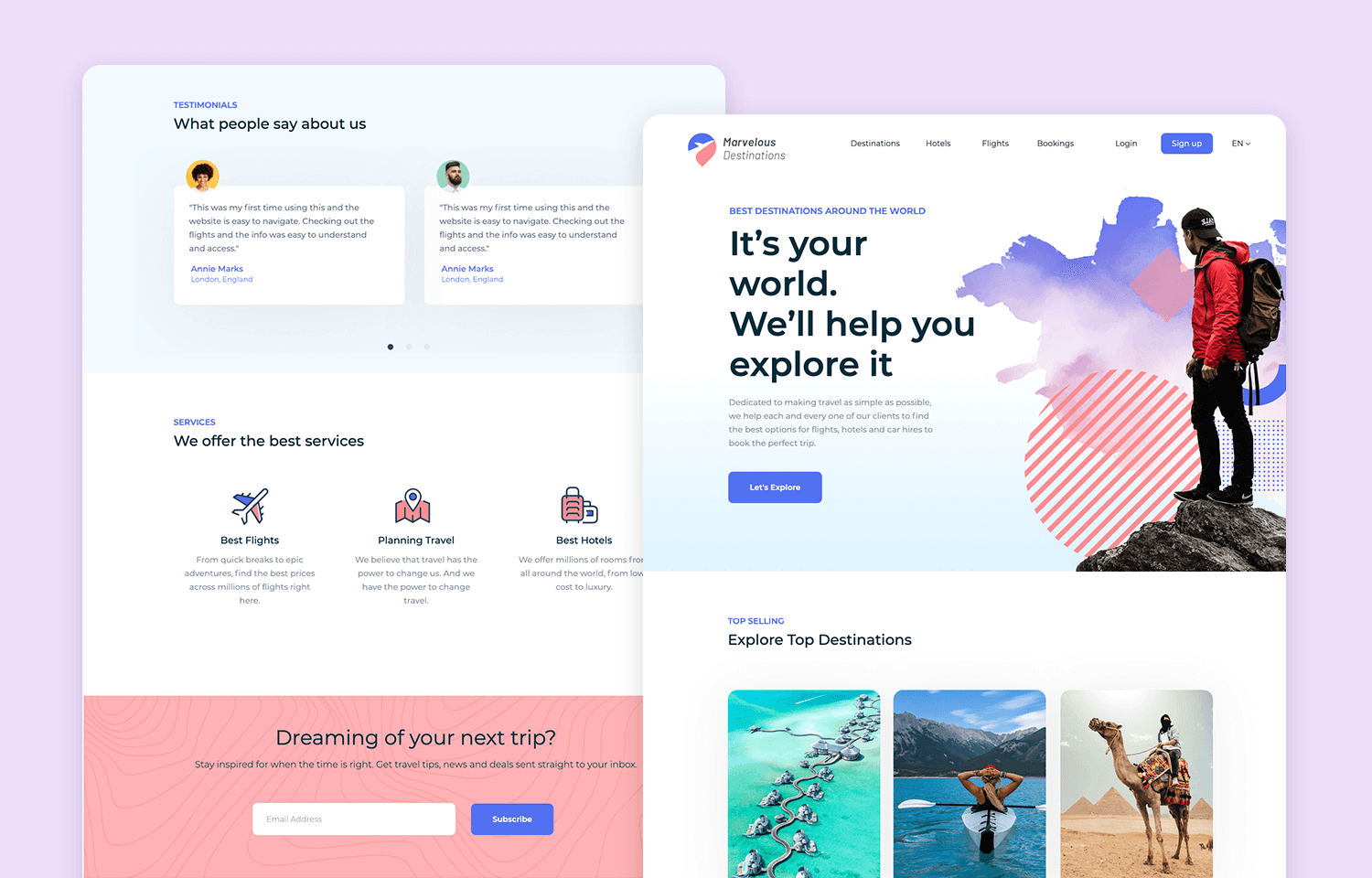
This wireframe demonstrates proper semantic layout with header, main content sections, and footer.
Mobile Website Structure:
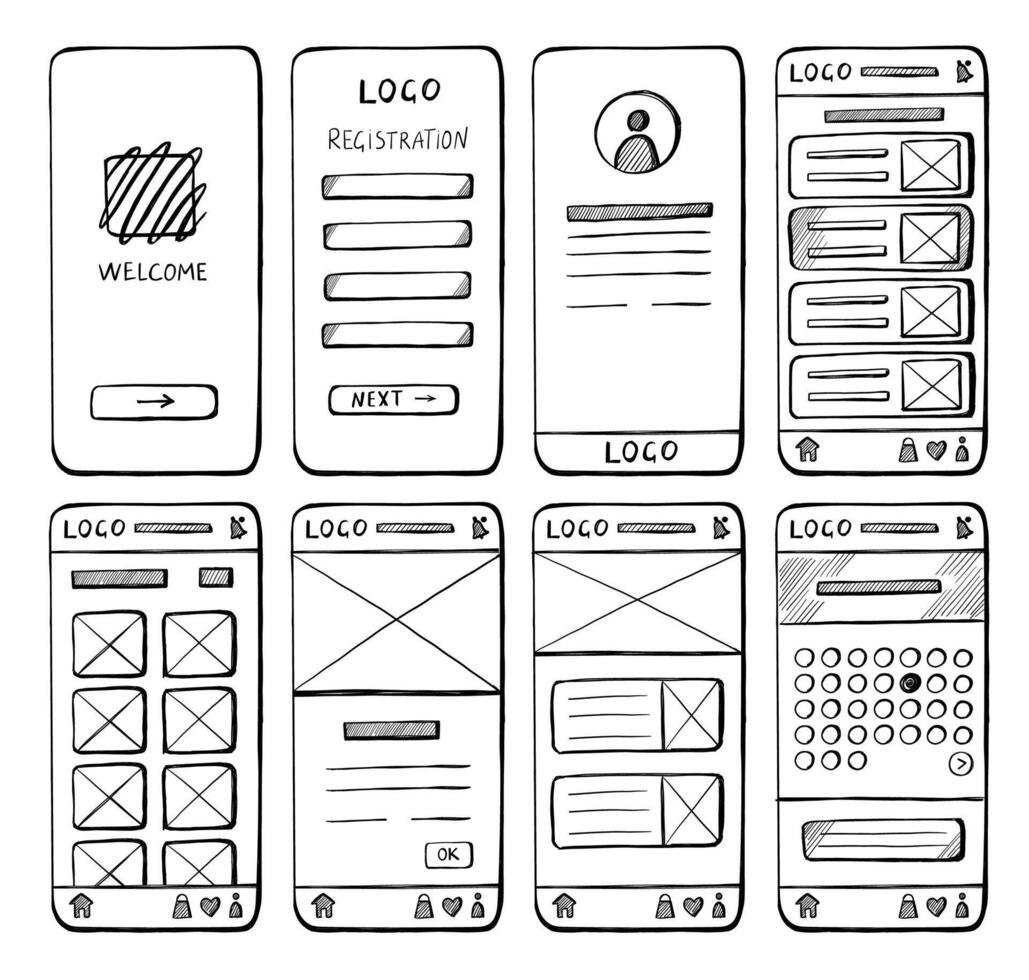
This mobile wireframe shows how semantic elements adapt to smaller screens with vertical stacking and touch-friendly navigation.
5. Creating Multiple Pages
Build a multi-page portfolio with consistent structure.
About Page (about.html)
<!DOCTYPE html>
<html lang="en">
<head>
<meta charset="UTF-8">
<meta name="viewport" content="width=device-width, initial-scale=1.0">
<title>About - John Doe</title>
<link rel="stylesheet" href="css/style.css">
</head>
<body>
<!-- SAME HEADER AS INDEX.HTML -->
<header class="site-header">
<div class="container">
<div class="logo">
<a href="index.html">
<img src="images/logo.png" alt="John Doe">
</a>
</div>
<nav class="main-nav">
<ul>
<li><a href="index.html">Home</a></li>
<li><a href="about.html" class="active">About</a></li>
<li><a href="projects.html">Projects</a></li>
<li><a href="contact.html">Contact</a></li>
</ul>
</nav>
</div>
</header>
<main>
<!-- Page Header -->
<section class="page-header">
<div class="container">
<h1>About Me</h1>
<p class="subtitle">Developer, problem solver, lifelong learner</p>
</div>
</section>
<!-- Bio Section -->
<section class="bio">
<div class="container">
<div class="bio-content">
<div class="bio-image">
<img src="images/profile.jpg" alt="John Doe">
</div>
<div class="bio-text">
<h2>Hi, I'm John</h2>
<p>
I'm a full-stack web developer based in Beijing, China.
After spending 5 years working with Python for data analysis,
I discovered my passion for building user-facing applications
and made the transition to web development.
</p>
<p>
Today, I specialize in modern JavaScript frameworks like Vue.js
and React, creating fast, accessible, and beautiful websites
for clients around the world.
</p>
<p>
When I'm not coding, you can find me exploring new technologies,
contributing to open-source projects, or enjoying a good cup of coffee.
</p>
</div>
</div>
</div>
</section>
<!-- Skills Section -->
<section class="skills">
<div class="container">
<h2>Skills & Technologies</h2>
<div class="skills-grid">
<div class="skill-category">
<h3>Frontend</h3>
<ul>
<li>HTML5 & CSS3</li>
<li>JavaScript (ES6+)</li>
<li>Vue.js & Nuxt</li>
<li>React & Next.js</li>
<li>Tailwind CSS</li>
</ul>
</div>
<div class="skill-category">
<h3>Backend</h3>
<ul>
<li>Node.js & Express</li>
<li>Python & FastAPI</li>
<li>RESTful APIs</li>
<li>GraphQL</li>
<li>MongoDB & PostgreSQL</li>
</ul>
</div>
<div class="skill-category">
<h3>Tools</h3>
<ul>
<li>Git & GitHub</li>
<li>VS Code</li>
<li>Figma</li>
<li>Docker</li>
<li>Webpack & Vite</li>
</ul>
</div>
</div>
</div>
</section>
<!-- Experience Section -->
<section class="experience">
<div class="container">
<h2>Experience</h2>
<article class="timeline-item">
<div class="timeline-date">2023 - Present</div>
<h3>Freelance Web Developer</h3>
<p>
Building custom websites and web applications for small businesses
and startups. Specializing in Vue.js and modern JavaScript.
</p>
</article>
<article class="timeline-item">
<div class="timeline-date">2020 - 2023</div>
<h3>Full-Stack Developer - Tech Startup</h3>
<p>
Developed and maintained internal tools and customer-facing
applications using React and Node.js.
</p>
</article>
<article class="timeline-item">
<div class="timeline-date">2018 - 2020</div>
<h3>Python Developer - Data Analytics Firm</h3>
<p>
Built data processing pipelines and visualization tools
using Python, pandas, and Flask.
</p>
</article>
</div>
</section>
<!-- CTA Section -->
<section class="cta">
<div class="container">
<h2>Interested in Working Together?</h2>
<a href="contact.html" class="btn btn-primary btn-large">
Let's Talk
</a>
</div>
</section>
</main>
<!-- SAME FOOTER AS INDEX.HTML -->
<footer class="site-footer">
<div class="container">
<nav class="footer-nav">
<ul>
<li><a href="index.html">Home</a></li>
<li><a href="about.html">About</a></li>
<li><a href="projects.html">Projects</a></li>
<li><a href="contact.html">Contact</a></li>
</ul>
</nav>
<div class="copyright">
<p>© 2025 John Doe. All rights reserved.</p>
</div>
</div>
</footer>
<script src="js/main.js"></script>
</body>
</html>
Projects Listing Page (projects.html)
<!DOCTYPE html>
<html lang="en">
<head>
<meta charset="UTF-8">
<meta name="viewport" content="width=device-width, initial-scale=1.0">
<title>Projects - John Doe</title>
<link rel="stylesheet" href="css/style.css">
</head>
<body>
<header class="site-header">
<!-- Same header as other pages -->
<div class="container">
<div class="logo">
<a href="index.html">
<img src="images/logo.png" alt="John Doe">
</a>
</div>
<nav class="main-nav">
<ul>
<li><a href="index.html">Home</a></li>
<li><a href="about.html">About</a></li>
<li><a href="projects.html" class="active">Projects</a></li>
<li><a href="contact.html">Contact</a></li>
</ul>
</nav>
</div>
</header>
<main>
<!-- Page Header -->
<section class="page-header">
<div class="container">
<h1>My Projects</h1>
<p class="subtitle">
A collection of web development projects I've built
</p>
</div>
</section>
<!-- Projects Grid -->
<section class="projects-section">
<div class="container">
<div class="projects-grid">
<!-- Repeat project cards from homepage -->
<article class="project-card">
<img src="images/projects/project-1.jpg" alt="Project 1">
<h3>E-commerce Platform</h3>
<p>Full-featured online store with cart and checkout</p>
<div class="tech-stack">
<span>Vue.js</span>
<span>Node.js</span>
<span>MongoDB</span>
</div>
<a href="project-1.html" class="btn btn-small">View Details</a>
</article>
<!-- Add more project cards... -->
</div>
</div>
</section>
</main>
<footer class="site-footer">
<!-- Same footer as other pages -->
</footer>
<script src="js/main.js"></script>
</body>
</html>
Contact Page (contact.html)
<!DOCTYPE html>
<html lang="en">
<head>
<meta charset="UTF-8">
<meta name="viewport" content="width=device-width, initial-scale=1.0">
<title>Contact - John Doe</title>
<link rel="stylesheet" href="css/style.css">
</head>
<body>
<header class="site-header">
<!-- Same header -->
</header>
<main>
<section class="page-header">
<div class="container">
<h1>Get in Touch</h1>
<p class="subtitle">Let's discuss your next project</p>
</div>
</section>
<section class="contact-section">
<div class="container">
<form class="contact-form" action="submit.php" method="POST">
<div class="form-group">
<label for="name">Name</label>
<input
type="text"
id="name"
name="name"
required
placeholder="Your name"
>
</div>
<div class="form-group">
<label for="email">Email</label>
<input
type="email"
id="email"
name="email"
required
placeholder="your@email.com"
>
</div>
<div class="form-group">
<label for="message">Message</label>
<textarea
id="message"
name="message"
rows="6"
required
placeholder="Tell me about your project..."
></textarea>
</div>
<button type="submit" class="btn btn-primary">
Send Message
</button>
</form>
</div>
</section>
</main>
<footer class="site-footer">
<!-- Same footer -->
</footer>
<script src="js/main.js"></script>
<script src="js/contact.js"></script>
</body>
</html>
6. Linking Pages Together
Proper navigation connects your pages seamlessly.
Relative Path Links
From homepage (index.html):
<a href="about.html">About</a>
<a href="projects.html">Projects</a>
<a href="contact.html">Contact</a>
<a href="project-1.html">Project Details</a>
From subpage back to homepage:
<a href="index.html">Home</a>
Links to files in subdirectories:
<!-- From index.html to file in pages/ folder -->
<a href="pages/about.html">About</a>
<!-- From pages/about.html back to index.html -->
<a href="../index.html">Home</a>
<!-- From pages/about.html to another page in pages/ -->
<a href="contact.html">Contact</a>
Internal Page Links (Anchors)
Link to section on same page:
<!-- Navigation link -->
<a href="#projects">View Projects</a>
<!-- Target section -->
<section id="projects">
<h2>My Projects</h2>
</section>
Link to section on different page:
<!-- From about.html to projects section on index.html -->
<a href="index.html#projects">See My Work</a>
External Links
Open in new tab:
<a href="https://github.com/username" target="_blank" rel="noopener">
GitHub Profile
</a>
Why rel="noopener":
- Security: Prevents new page from accessing your page
- Performance: Better for page speed
- Always use with
target="_blank"
Email and Phone Links
<!-- Email link (opens mail client) -->
<a href="mailto:your@email.com">Send Email</a>
<!-- With subject and body -->
<a href="mailto:your@email.com?subject=Hello&body=I'd like to work with you">
Email Me
</a>
<!-- Phone link (clickable on mobile) -->
<a href="tel:+86-123-4567-8900">Call Me</a>
Download Links
<!-- Download file instead of opening it -->
<a href="assets/resume.pdf" download>Download Resume</a>
<!-- Specify download filename -->
<a href="assets/cv.pdf" download="John-Doe-Resume.pdf">
Download My Resume
</a>
7. Creating Starter Templates
Build reusable templates to speed up development.
Basic Page Template (template.html)
<!DOCTYPE html>
<html lang="en">
<head>
<meta charset="UTF-8">
<meta name="viewport" content="width=device-width, initial-scale=1.0">
<meta name="description" content="Page description here">
<title>Page Title - Your Name</title>
<link rel="icon" type="image/png" href="assets/icons/favicon.png">
<link rel="stylesheet" href="css/style.css">
</head>
<body>
<!-- HEADER: Copy from existing pages -->
<header class="site-header">
<div class="container">
<div class="logo">
<a href="index.html">
<img src="images/logo.png" alt="Your Name">
</a>
</div>
<nav class="main-nav">
<ul>
<li><a href="index.html">Home</a></li>
<li><a href="about.html">About</a></li>
<li><a href="projects.html">Projects</a></li>
<li><a href="contact.html">Contact</a></li>
</ul>
</nav>
</div>
</header>
<!-- MAIN CONTENT: Customize for each page -->
<main>
<section class="page-header">
<div class="container">
<h1>Page Title Here</h1>
<p class="subtitle">Page subtitle or description</p>
</div>
</section>
<section class="content">
<div class="container">
<!-- Your content here -->
</div>
</section>
</main>
<!-- FOOTER: Copy from existing pages -->
<footer class="site-footer">
<div class="container">
<nav class="footer-nav">
<ul>
<li><a href="index.html">Home</a></li>
<li><a href="about.html">About</a></li>
<li><a href="projects.html">Projects</a></li>
<li><a href="contact.html">Contact</a></li>
</ul>
</nav>
<div class="copyright">
<p>© 2025 Your Name. All rights reserved.</p>
</div>
</div>
</footer>
<script src="js/main.js"></script>
</body>
</html>
Using the Template
Steps to create a new page:
- Copy template.html
cp template.html new-page.html - Update page-specific content:
- Change
<title>tag - Update meta description
- Change page header text
- Add your content in main section
- Update "active" class in navigation
- Change
- Link to navigation:
<li><a href="new-page.html">New Page</a></li>
8. Practical Exercises
Exercise 2.1: Create Project Structure
Set up a complete portfolio structure:
- Create all necessary folders (css/, js/, images/)
- Add subfolder for project images
- Create placeholder files (index.html, about.html, etc.)
- Verify structure matches best practices
Exercise 2.2: Build Homepage
Create a complete homepage with:
- Proper HTML5 DOCTYPE and head section
- Header with logo and navigation
- Hero section with headline and CTA
- Projects section with 3 project cards
- About section snippet
- Footer with links and copyright
Exercise 2.3: Create Additional Pages
Build three more pages:
- About page with bio, skills, experience
- Projects page with project grid
- Contact page with contact form
- Ensure consistent header/footer across all pages
Exercise 2.4: Implement Navigation
Add complete navigation:
- Main navigation in header
- Footer navigation
- "Active" state for current page
- Internal page links (anchors)
- External links (GitHub, LinkedIn)
- Test all links work correctly
Exercise 2.5: Create Page Template
Build a reusable template:
- Create template.html with header/footer
- Add comments for customization points
- Use template to create a new "Blog" page
- Verify consistency across all pages
9. Knowledge Check
Question 1: Why is proper folder structure important?
Show answer
It makes files easy to find, scales as projects grow, separates concerns clearly, and creates professional, maintainable code. It also helps with deployment and team collaboration.Question 2: What's the required filename for a website's homepage?
Show answer
index.html - Web servers automatically serve this file when users visit your root domain (e.g., example.com loads example.com/index.html).Question 3: How many <main> elements should a page have?
Show answer
Only ONE `Question 4: What's the difference between <section> and <article>?
Show answer
`Question 5: How do you link to a file in a parent directory?
Show answer
Use `../` to go up one level. Example: from `pages/about.html` to root `index.html`, use ``.Question 6: Why should external links include rel="noopener"?
Show answer
For security and performance. It prevents the new page from accessing your page via JavaScript and improves page speed. Always use with `target="_blank"`.10. Common Structure Mistakes
Mixed File Locations
Bad structure:
my-portfolio/
├── index.html
├── about.html
├── style.css ✗ Should be in css/
├── main.js ✗ Should be in js/
├── logo.png ✗ Should be in images/
└── project1.jpg ✗ Should be in images/projects/
Good structure:
my-portfolio/
├── index.html
├── about.html
├── css/
│ └── style.css ✓
├── js/
│ └── main.js ✓
└── images/
├── logo.png ✓
└── projects/
└── project1.jpg ✓
Broken Links (Path Errors)
Common mistakes:
<!-- Forgot file extension -->
<a href="about">About</a> ✗
<a href="about.html">About</a> ✓
<!-- Wrong path from subdirectory -->
<!-- In pages/blog.html: -->
<a href="index.html">Home</a> ✗
<a href="../index.html">Home</a> ✓
<!-- Absolute path (breaks on deployment) -->
<a href="/Users/me/project/about.html"> ✗
<a href="about.html"> ✓
Inconsistent Header/Footer
Problem:
Homepage: Header with logo on left
About page: Header with logo on right ✗
Projects: Different navigation order ✗
Solution:
Use identical header/footer HTML on ALL pages ✓
Only change the "active" class for current page ✓
Missing Semantic Elements
Bad (using divs):
<div class="header">...</div>
<div class="nav">...</div>
<div class="main">...</div>
<div class="footer">...</div>
Good (semantic HTML5):
<header>...</header>
<nav>...</nav>
<main>...</main>
<footer>...</footer>
11. File Structure Checklist
Before moving to styling, verify:
Folder Structure:
□ All HTML files in root directory
□ CSS files in css/ folder
□ JavaScript files in js/ folder
□ Images organized in images/ (with subfolders)
□ Assets (PDFs, fonts) in assets/ folder
File Naming:
□ Homepage is named index.html
□ All filenames are lowercase
□ Multi-word files use hyphens (project-details.html)
□ No spaces in any filenames
□ Descriptive and clear names
HTML Structure:
□ All pages have proper DOCTYPE
□ Charset and viewport meta tags included
□ Unique, descriptive title for each page
□ Semantic elements used (header, nav, main, footer)
□ Only ONE <main> element per page
□ Consistent header/footer across pages
Navigation:
□ All internal links work correctly
□ External links open in new tab with rel="noopener"
□ Active page highlighted in navigation
□ Footer navigation matches header navigation
□ Email and social links functional
Template:
□ Created reusable page template
□ Header/footer commented for easy reuse
□ Template documented with instructions
12. Key Takeaways
- Organize files properly - Use css/, js/, images/ folders
- Name files correctly - Lowercase, hyphens, descriptive
- index.html is required - Homepage must be named index.html
- Use semantic HTML5 - header, nav, main, section, footer
- ONE main per page - Only one
<main>element - Consistent structure - Same header/footer on all pages
- Relative paths - Use relative links (about.html, not /Users/...)
- External links security - Always use rel="noopener" with target="_blank"
- Create templates - Reusable page template saves time
- Test all links - Verify navigation works before moving on
13. Further Resources
File Structure:
Navigation:
Templates:
Next Steps
Excellent work! You now have a complete, well-structured multi-page portfolio with proper organization and semantic HTML.
In Lesson 3: Content & Navigation, you'll learn how to write web-friendly content, implement responsive navigation menus, and create an effective user experience.